KDW PS3 ANALYZER

Updated: Sep 3
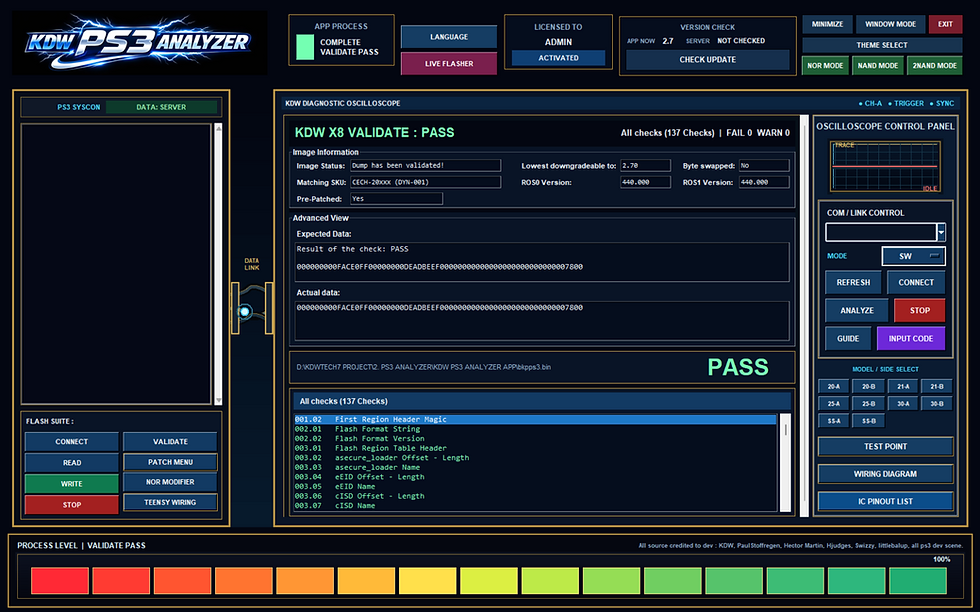
Feature :
PS3 ANALYZER :
- Analyze with uart
- Analyze Via uart , Input Code
- Nor Programming : Dump/flash/verify Nor via teensy 2++
- Nor Programming : Validate, Rebuild, Unbrick, Fix Corupted Nor, Nor Modifier .
- Live Flahser -> Wireles Programming : Downgrade Via Wifi/lan from soft to ps3 ( without dismantle console ) .
- Include Wiring diagram + Teensy wiring diagram .
Next future FINAL update plan ,
but still still in Long development :
LIVE Programming :
( Console Must Be powering On and Stay on XMB )
( Wireless programming from app to ps3 console without dismantle )
> Dump / Flash / Patch Live
> Fix Corrupted Nor
> [ Experimental ] : Testing All console function include : Buzzer Test , Fan Test , Temperature Monitoring In Graphically, Testing Usb Slot, Power / eject button test, Include Selft test .
[ LIVE Analyzing Measurement ]
> STM32/ESP/PICO Based Microcontroller Support ( For Diy Portable Multimeter, that will be paired to this app , You will assembly by self to make this working with app ) For live testing to Console motherboard test point, then app will be in Live Measurement mode . in this mode, you can use Red and Black probe to start live measurement to ps3 motherboard , app will check point and notificate you with > PASS / FAIL. in example we measure RSX IC, you can follow guide to measure that point and look at app screen , If pin is normal / in good condition , result must be OK, BAD, FAIL .
Full Guide Can Be access Here :
Download :
TRIAL VERSION
You can try this software fo 7 days
FULL VERSION
You can purchase from here :
or contact me via :
Whatsapp : +6285364078910
email :kdwgamestore@gmail.com
Indonesia only :
THIS APPLICATION WORK OFFLINE MODE
ONLINE FOR CHECK NEW UPDATE ONLY
Comments